I get asked a lot about why some local businesses dominate search results while others stay invisible. Usually people expect some complicated answer about backlinks or content marketing or whatever the latest SEO guru is selling.
But last week I looked at 50 local business websites that rank well versus 50 that don’t. The pattern was stupidly obvious. The winners had URLs that made sense. Like plumber.com/seattle/emergency-service. The losers had garbage like plumber.com/page.php?id=47&loc=sea&serv=emrg.
That’s it. That’s the difference. Your URL structure is literally telling Google where you operate and what you do. Mess it up and you’re basically asking Google to guess. And Google doesn’t like guessing.
Why Your URL Structure Matters for Local Business
Most business owners think URLs are just web addresses. Some random thing that happens when you build a website. Wrong.
Google reads your URLs like street signs. When someone searches for “dentist near me” or “pizza delivery Chicago,” Google looks at URL patterns to figure out which businesses serve that area. A URL like yourrestaurant.com/chicago/delivery is a neon sign saying “WE DELIVER IN CHICAGO.” A URL like yourrestaurant.com/page-47829?location=chi tells Google nothing.
I worked with a roofing company that couldn’t rank for anything. Their URLs looked like someone threw a keyword dictionary in a blender. After we restructured them to actually make sense? Top three rankings in five suburbs. No new content. No expensive links. Just URLs that weren’t stupid.
The Foundation: Keep Your URLs Simple and Logical
Your URLs should make sense to a drunk person squinting at their phone at 2 AM. If they can’t figure out what page they’re on from the URL, you’ve already failed.
Here’s what works:
- yourlawfirm.com/practice-areas/personal-injury
- yourdentist.com/services/teeth-cleaning
- yourrestaurant.com/menu/appetizers
Here’s what makes me want to punch through the wall:
- yourlawfirm.com/index.php?page=services&cat=personal&type=injury
- yourdentist.com/dental-services-teeth-cleaning-preventive-care-oral-health-best-dentist
- yourrestaurant.com/menu/a/the/best/appetizers/in/town/2024
Those URLs with question marks and parameters? Google struggles with them. Those keyword-stuffed monstrosities? They look like spam and get cut off in search results anyway.
Pick one main keyword per page. If you’re a contractor, yourcompany.com/services/kitchen-remodeling beats the hell out of yourcompany.com/kitchen-remodeling-renovation-contractor-services-residential-commercial-best-quality.
Geo-Targeting: The Part Everyone Messes Up
This is where local businesses shoot themselves in the foot. They create pages for different service areas but structure their URLs like they’re Amazon instead of Joe’s Plumbing.
The Right Way to Structure Location-Based URLs
If you serve multiple areas, make it obvious. Put the location first, then the service:
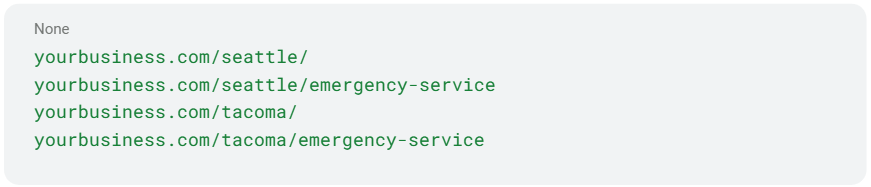
This tells Google everything under /seattle/ is about your Seattle services. It’s like labeling file folders. Even an intern could figure it out.
I watched a landscaping company go from invisible to booked solid just by fixing this. They went from URLs like landscaper.com/lawn-care-services-bellevue-washington-98004 to landscaper.com/bellevue/lawn-care. Suddenly Google understood they worked in Bellevue. Revolutionary concept, right?
When You Should (and Shouldn’t) Use Country Codes
Local US businesses: stick with .com. Period.
I don’t care if GoDaddy is having a sale on .us domains. I don’t care if .ninja sounds cool. Use .com like a normal person. The only exception is if you’re actually international. Then country-specific domains might help. But Joe’s Pizza in Brooklyn doesn’t need a .us domain to rank in Brooklyn.
The Subdirectory Strategy That Works
Forget subdomains. Forget multiple websites. Use subdirectories to organize your location content:

Clean. Logical. Scalable. Even your nephew who “knows computers” can understand it.
Technical Crap That Matters
HTTPS or GTFO
If your site still uses HTTP, fix it. Now. Today. Before you read another word.
Look at your URL. Does it say https://? No? Then you’re telling Google and every visitor that you’re stuck in 2010. Most hosting companies do this for free. If yours charges extra, get a new host.
URL Mistakes That Murder Your Rankings
I see these constantly:
Stop words: Ditch “a,” “an,” “the,” “and,” “or” from URLs. Nobody needs yourbusiness.com/the-best-pizza-in-the-town. Make it yourbusiness.com/best-pizza.
Special characters: Letters, numbers, hyphens. That’s it. No spaces, no ampersands, no cute symbols. yourbusiness.com/services-&-pricing becomes yourbusiness.com/services-pricing.
Duplicate content: If yourbusiness.com/about and yourbusiness.com/about-us show the same page, pick one and redirect the other. Don’t make Google choose.
Dynamic parameters: Those URLs with ? and = and & everywhere? They’re killing you. page.php?id=47&cat=services&loc=denver should be denver/services. Your developer might whine about database queries. Tell them to figure it out.
The Hreflang Thing
Unless you’re targeting multiple countries or languages, ignore hreflang completely. It’s for international businesses, not Bob’s Auto Repair. Don’t let some SEO guru convince you otherwise.
Real Examples from Businesses That Get It
Multi-location dental practice:
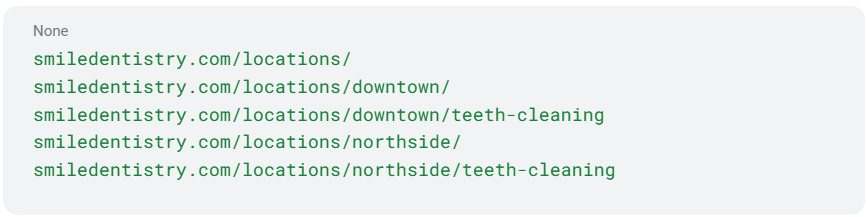
HVAC company covering multiple cities:

See the pattern? Location first, service second. No keyword stuffing. No confusion. Just clarity.
Stop Overthinking and Start Fixing
Audit your URLs right now. Open your website. Click around. Do your URLs make sense? Could your mom figure out what each page is about just from the URL?
If your URLs are terrible, don’t panic. You can fix them with redirects. Just make sure every old URL points to a new one. Breaking links is worse than bad URLs.
For most local businesses, the formula is simple:
- Domain + location + service for multi-location businesses
- Domain + service for single-location businesses
- Keep it short, descriptive, and focused
I’ve seen too many businesses obsess over meta descriptions and schema markup while their URLs look like a cat walked across the keyboard. Fix the basics first.
Your URL structure is like your store’s street address. Make it clear where you are and what you do, and customers (and Google) will find you. Make it confusing, and they’ll go to your competitor with the cleaner URLs.
This isn’t rocket science. It’s just common sense that most web developers ignore because they’re too busy being clever. Stop being clever. Start being clear.